
Roly Poly Documentation
Overview
Roly Poly is a simple, free customization that makes it easy to copy permissions from one application user to another.
Installation and Configuration
Once you've downloaded the customization, unzip the downloaded file.
Inside, you will find a \bin\ and \browser\ folder.
Simply copy these into the \vroot\ folder on your server.
Note: This deployment package is also compatible with the Blackbaud CRM cloud deployment tool.
After deployment is complete, log into BBCRM and navigate to Administration>Application>Catalog Browser.
Once you are there, filter for a type of "Package" and an author of "Styons Software".
Load the RolyPoly package.
Options
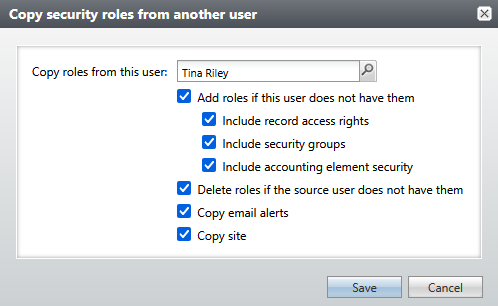
Copy roles from this user
Search for a user whose permissions are a model for the current user.
Add roles if this user does not have them
Look for roles that the 'copy from' user has, but this user does not. Add them to this user.
Include record access rights
Within each copied role, also copy over the record access rights for that role.
Include security groups
Within each copied role, also copy over the security group rights for that role.
Include accounting element security
Within each copied role, also copy over the accounting element security rights.
Delete roles if the source user does not have them
Look for roles that the current user has, but the 'copy from' user does not have. Delete them from the current user.
When combined with the 'Add roles if this user does not have them' option, this fully synchronizes the roles.
Copy email alerts
Give this user the same email alerts that the 'copy from' user has.
Note: this does not remove any email alerts from the current user - it only adds.
Copy site
Give this user the same site that the 'copy from' user has.